

How the 2026 GMC Canyon’s Head-Up Display Helps Quakertown, PA Drivers Stay Focused
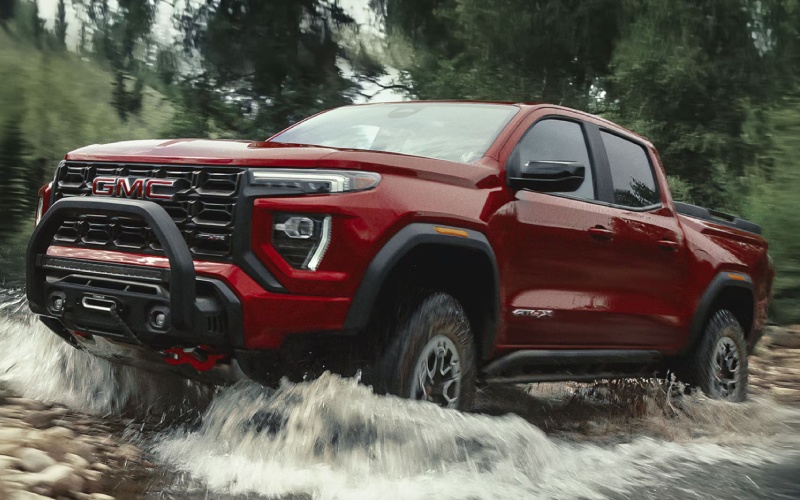
Patriot GMC of Boyertown – How the 2026 GMC Canyon’s Head-Up Display Helps Quakertown, PA Drivers Stay Focused
The 2026 GMC Canyon is packed with practical technology, but one feature Quakertown, PA drivers notice right away is the available 6.3-inch multicolor Head-Up Display. When daily routes blend Route 309 stretches with borough traffic and quick turns onto neighborhood streets, seeing speed, navigation prompts, and driver-assist alerts in your forward view makes an immediate difference. It’s a smart detail that fits the Canyon’s broader theme: capability that feels intuitive, not complicated.
Why a Head-Up Display Works in Real-World Driving
In theory, glancing down at a gauge or infotainment screen is quick. In practice, those split-second checks add up—especially when you’re merging, towing, or navigating unfamiliar side streets. The Canyon’s Head-Up Display (HUD) helps by projecting configurable, high-contrast information right onto the windshield in your line of sight. You’ll keep more attention on what’s ahead while still tracking the details you depend on, from posted-speed reminders to turn-by-turn directions.
On Quakertown’s mix of straightaways and tighter, stop-and-go blocks, the HUD softens the mental overhead of juggling different readouts. It pairs naturally with the Canyon’s standard dual-screen setup—an 11.3-inch center touchscreen and an 11.0-inch Driver Information Center—so you can distribute what you monitor where it makes the most sense. Keep primary alerts and navigation cues on the HUD, then glance to the main display for a larger map or trail camera view when you’re stopped or moving slowly.
How the HUD Complements the Canyon’s Camera Views
One of the Canyon’s biggest strengths is visibility. With up to 10 available camera views—front, rear, top-down, hitch, sides, and first-in-class underbody cameras—the truck gives you angles that simplify both urban and trail driving. While the HUD doesn’t show those camera images (they display on the center screen), the pairing pays off in practice. You’ll line up to a hitch more confidently using Hitch View, then keep speed and instruction cues on the HUD as you roll out on Route 313. When you head off pavement, the underbody cameras help you see obstacles below, and the HUD keeps trail-speed awareness front and center so you can place the truck precisely without shifting focus.
For drivers who regularly park in tight borough spots, back into driveways, or pick through congested lots near restaurants and shops, this tech team-up reduces the mental switching costs of modern driving. You get a clearer look where you need it and faster feedback about what matters most—without feeling overloaded.
Everyday Wins for Commuters and Weekend Towing
Beyond the wow factor, the Canyon’s HUD and display setup create tangible benefits for local routines. Commuters who make the daily move along Route 309 will appreciate fewer down-glances in flowing traffic. Parents running to practices and errands will like that posted-speed reminders and navigation prompts are more visible, cutting down on missed turns. And for drivers who tow—utility trailers, small boats, or weekend project supplies—the ProGrade® Trailering System plus the HUD’s forward-view context keeps departure, merging, and lane changes feeling composed.
It’s a similar story on rolling backroads outside Quakertown, where varying speed limits and turns can sneak up. The HUD consistently brings those cues to where your eyes already are: forward. If you’ve ever wished the truck could put just the right bit of information right where you want it, this is that wish answered in a clean, seamless way.
Driver-Focused Cabin: It’s Not Just the HUD
The HUD is one part of a cohesive, driver-first interior. The Canyon’s 11.3-inch center screen is quick to respond and easy to customize, so your most-used apps and settings are never buried. The 11.0-inch Driver Information Center offers crisp, configurable layouts for trip data, tire pressures, and off-road metrics. Wireless Apple CarPlay® and Android Auto™ keep your phone in play without a cable, and available Google built-in integrates voice help, maps, and media with minimal tapping. It’s one of those cabins that makes the tech feel natural instead of fussy.
Audio lovers can add the available Bose 7-speaker system for balanced, powerful sound. And comfort stays front and center with available dual-zone climate control, a heated, power-adjustable driver’s seat, and rear-console vents to keep passengers happy. In short, GMC made the Canyon’s interior do more—and do it with less distraction.
Trail Readiness with Real-World Payoff
Quakertown drivers who work hard during the week often want a truck that’s fun and capable on weekends. The Canyon’s Off-Road Performance Display helps by pulling up data like pitch and roll, tire pressures, and (on AT4X) Baja and overlanding metrics you’ll actually use on gravel and rutted access paths. Combine that with the factory 2-inch lift (or 3 inches on AT4X), and the truck feels poised and stable in places where a lower, street-only suspension can start to feel out of its depth.
Even if your “off-road” is a muddy jobsite, the Canyon’s stance and camera coverage add genuine assurance. It’s easy to say you don’t need that capability—until the day you do. Then you’ll be glad it’s there.
Frequently Asked Questions:
What information can I see on the Canyon’s Head-Up Display?
You can configure the HUD to show essentials like speed, posted-speed alerts, navigation prompts, and select driver-assist alerts. It keeps key data in your forward view so you can maintain focus on the road or trail.
Is the Head-Up Display standard on every 2026 Canyon?
The multicolor 6.3-inch HUD is available on the lineup and standard on Denali. Our team can help you compare trims and packages to match your feature priorities.
How do the underbody cameras help?
They provide front and rear views beneath the truck to spot rocks, ruts, and obstacles that regular cameras can’t see. They’re standard on AT4X and available as part of the broader camera suite.
Can I use the HUD while towing?
Yes. It’s useful for keeping speed and navigation prompts in your line of sight when merging, cruising, or exiting while towing. Combine it with the ProGrade® Trailering System and Hitch View for a confident towing setup.
Does the Canyon’s interior tech require a steep learning curve?
No. The interface is intuitive, with logical menus and quick responses. Wireless Apple CarPlay® and Android Auto™ make it familiar from day one, and available Google built-in streamlines maps and voice control.
For shoppers who want smarter visibility without overcomplication, the 2026 Canyon’s Head-Up Display and driver-focused screens hit the sweet spot. It’s one of those features you appreciate a little on day one—and a lot by week two.
At Patriot Buick GMC of Boyertown, we can walk you through the HUD’s customization options, help you compare trims that include it, and show how it fits with camera views and trailering tools. With a quick test drive on routes that mirror your real-world driving, you’ll feel how naturally it all comes together.
If you’re weighing trucks across the segment, the Canyon’s forward-focused visibility story is a major differentiator. It complements the truck’s strength—best-in-class standard gas engine torque, available camera coverage rivals can’t match, and a factory lift that’s ready for more than just curb appeal. For Quakertown drivers who value capability with clarity, it’s a compelling combination.
We’re proudly serving Gilbertsville, Quakertown, and Emmaus and can help you configure a Canyon that feels right from day one—on the streets you know best and the projects you take on next.
0 comment(s) so far on How the 2026 GMC Canyon’s Head-Up Display Helps Quakertown, PA Drivers Stay Focused